
By default, WordPress will create a URL (web page address) for your page or subpage. This URL will be based on the title of the page, but in a browser friendly language.
E.g.: Your page About Serve the City will by default have the URL www.stcdomainname.tld/about-serve-the-city/.
You might want to change this for different reasons… (the page title changed, the url is too long for your taste, …). In our example, we want the page to have the URL www.stcdomainname.tld/about/ because we think it is better.
To do so, press on the button “Edit” just under the title, next to the permalink.
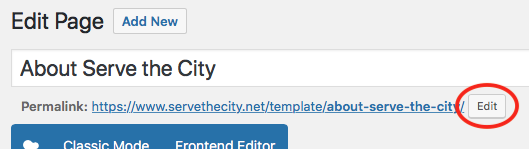
Change the URL to what you would like (in our case, “about”).

And don’t forget to click “OK” and to UPDATE the page for the change to take effect.
Please note that you can only modify the part of the URL that belongs to the page. If your page has a parent page (e.g. /volunteer/montly-events/, in this case, volunteer is the parent page, monthly-events the child page), you will need to modify the parent page’s URL to modify this part.