
Is it possible to set a maximum amount of sign-ups for an event and block further signing-up when this maximum is reached?
Yes.
In the Forms’ Settings, you have the possibility to define a lot of options, including the maximum number of entries (signups).
Go to your form’s Setting page and scroll to the restrictions. Check the Limit number of entries check box and set your preferences, then save the options by updating the form settings.
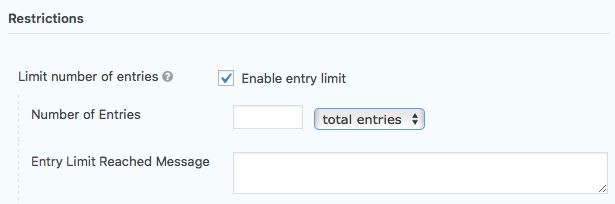
Once the limit will be reached, the form will automatically stop being displayed, and it will update the event itself to mark it as full (which will add a “Full” banner on the thumbnail).
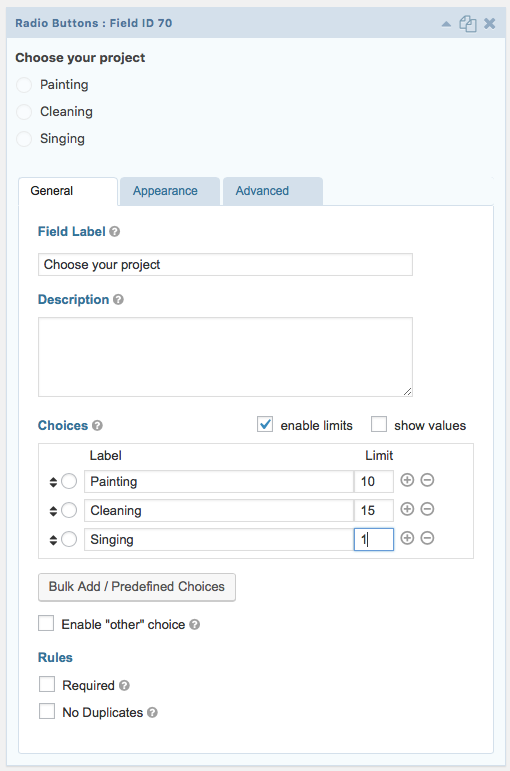
In the case of a unique form where people choose their project and the limit needs to be managed for that specific multi option field, you will need to do the following:
- First, go to Plugins and activate the “GP Limit Choices” plugin.

- Once this is done, go to your form, and to the project selection field, check the “enable limits” checkbox and fill the limits as you need to, then save the form.
Furthermore can this counter be made visible on the site (and if so: how?)?
Unfortunately, at this stage, it is only possible to show if a project / event is full.