
Yes!
Mailchimp has a pretty detailed documentation of how to get your mailing list GDPR compliant and it can be found here.
In a nutshell, but please do read the guide entirely, you need to do the following:
- have a privacy policy in place. (see GDPR – How to create a Data Protection Policy page?)
- edit your form to add the consent checkbox. (see GDPR – How to add the consent checkbox?)
- sign the Data Processing Agreement with Mailchimp if applicable.
- create a new field in your list called GDPR (or anything similar) so that anyone who registers now is added to that group as they give their consent. (see below).
- modify the form’s Mailchimp feed to add people to that group. (see below).
- for European cities or European subscribers, send them an email asking them to opt in to your newsletter again, giving the consent.
- from now on, only send newsletter to people who gave their consent (in case of European cities) or to anyone except European citizens who didn’t give their explicit consent (for other cities). This last option is trickier and many companies have decided to apply the same rules to their customers wherever they are from, as it is easier to maintain the same set of rules.
Create a GDPR field and a GDPR group in Mailchimp
Firs of all, if you have read the Mailchimp guide linked up here, you notice that our approach is slightly different. Indeed they have set up a “GDPR” check box that you can activate for forms. Unfortunately, it is not possible to modify this data from the website, meaning we cannot tell mail chimp from the website that the person has indeed given his/her consent. Which defeats the point.
This is why we are creating a field / group.
First, log in to Mailchimp and select the list you want to modify.
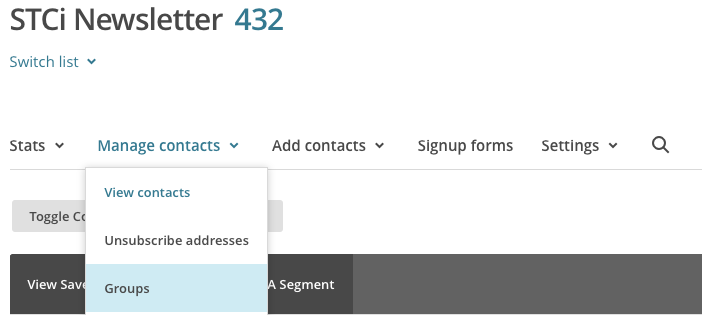
Go to Manage Contacts > Groups
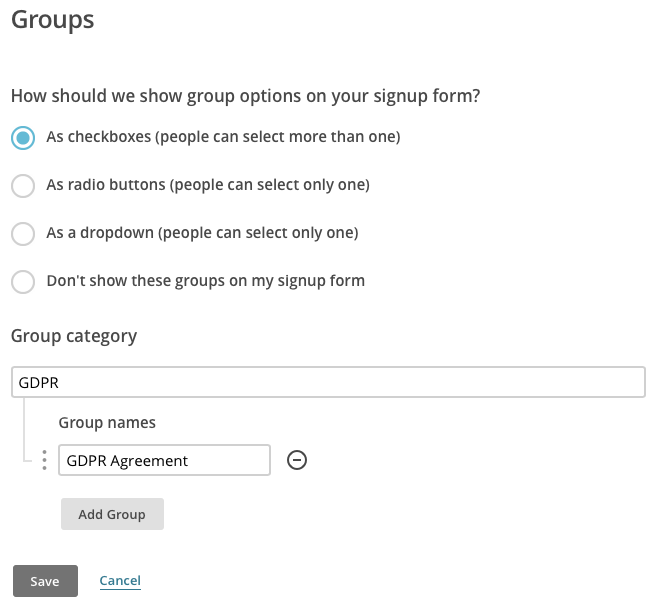
Create a new group like shown below, then save.
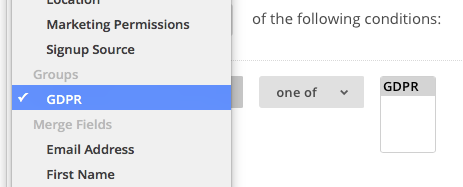
Now let’s create a Segment that will only show you people from that group, and another segment showing you people not in that group. This allows you to select who to send your newsletter.
Go to Manage Contacts > View Contacts, then click on Create a segment.
Create with the following options, click preview, then DO NOT FORGET TO SAVE by clicking “Save as segment” on the top right. Name it GDPR.
Repeat the step with the following data. Name it Not GDPR.
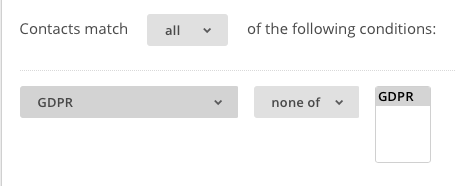
You now have an easy way to distinguish between the people who gave their consent and the ones who didn’t.
Now we will see how to make it happen that the web form updates the info on Mailchimp.
How to modify the form’s feed to add people to the group?
Let’s first go to Forms, then on the form that you have linked to mail chimp (usually Newsletter) go to Settings > Mailchimp. You should see a mail chimp feed. If not, refer to How to configure your MailChimp account on the website?
Edit the feed.
Because your website is connected via API to Mailchimp and because you created the GDPR group using the instructions above, you should now see a group option with the GDPR (or whichever name was given).
Check the box and mark it as Always, as the consent is mandatory to submit the form.

Save by clicking Update settings.
You are all configured. You only need to get your existing base of subscribers to give their consent by filling the form again.
Get subscribers to give their consent
The easiest way to get your existing subscribers to give their consent to the Policy is to send them an email with a link to a dedicated page for the newsletter.
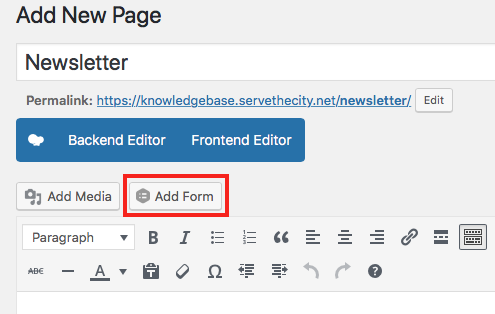
If you do not have a newsletter page, go to Pages > Add new. Name it Newsletter, and insert the newsletter form. Publish the page.
Now create a new campaign in Mailchimp explaining why you need people to give their consent. Here is a sample text. Make sure to add the appropriate links where needed.
As you probably heard, on May 25th, a new regulation called GDPR came into action in Europe (and beyond). This new regulation gives stricter and better guidelines on how companies and organisations manage personal data.
We at Serve the City take the matter seriously and have been working hard to be compliant.
In a nutshell, we have updated our Data Privacy Policy [insert privacy policy link], as well as made sure that your sensitive data is encrypted and that we only ask you the data we need to organise our projects.
We have also modified our sign up forms to ask you for your consent, which you might already have noticed.
To make things clear, we will NEVER sell your personal data to any tier.
What do we need from you?
In order for us to keep you informed of our upcoming events, we need you to go to this page [insert newsletter link] and sign up for our newsletter again (yes, again. We know, it’s a pain, but it is really fast).
It is really important that you do so if you want to keep receiving updates from us.
Go to the newsletter sign up page [insert newsletter link]
Thank you for understanding and trusting us with your data.
This is it!